Module 6 · Excel for Data Analysis
XLOOKUP
Bring columns from one table into another with XLOOKUP, and recognise VLOOKUP and INDEX/MATCH in older files.
About 35 minutes
The problem
The director asks: "How much did we sell in Lagos? And how much in Beverages?" The orders table has customer_id and product_id, but no region and no category. Those live in customers.csv and products.csv. You need to bring them across, row by row. That's a lookup.
The concept
XLOOKUP finds a value in one column and returns the matching value from another:
Excel formula
=XLOOKUP(lookup_value, lookup_array, return_array, [if_not_found])lookup_value: what you're looking for (this order's customer_id)lookup_array: where to look for it (the customer_id column of Customers)return_array: what to bring back (the region column of Customers)if_not_found: optional text to show instead of#N/A
Region for each order line:
Excel formula
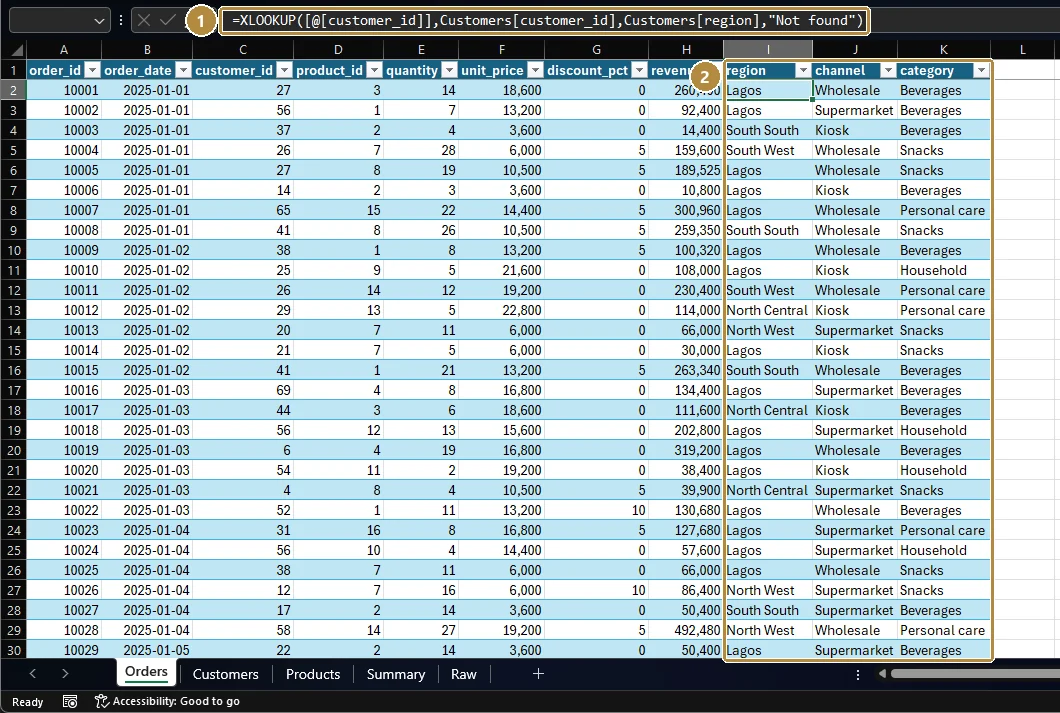
=XLOOKUP([@customer_id], Customers[customer_id], Customers[region], "Not found")XLOOKUP matches exactly by default, which is what you want for IDs.
In older files you'll meet two other methods:
Excel formula
=VLOOKUP(C2, Customers!A:H, 4, FALSE)
=INDEX(Customers!D:D, MATCH(C2, Customers!A:A, 0))- VLOOKUP needs the ID in the first column and a column number (4). Insert a column and the number silently points at the wrong data. Always use
FALSEfor exact match; the default (TRUE) returns wrong values on unsorted data. - INDEX/MATCH was the robust choice before XLOOKUP and still works everywhere.
Google Sheets supports XLOOKUP too.
Example
Order line 10001 has customer_id 27 and product_id 3.
XLOOKUP(27, Customers[customer_id], Customers[region])returns the region of customer 27.XLOOKUP(3, Products[product_id], Products[category])returns Beverages (product 3 is Orange juice 1L).
After the walkthrough below, the Orders table has three looked-up columns:
Walkthrough
- Load
customers.csvandproducts.csvinto the same workbook as Tables namedCustomersandProducts(Data → From Text/CSV, as in lesson 2). - In the Orders table, add a column
region:=XLOOKUP([@customer_id], Customers[customer_id], Customers[region], "Not found") - Add a column
category:=XLOOKUP([@product_id], Products[product_id], Products[category], "Not found") - Filter each new column for "Not found". There should be none; if there are, some IDs don't match.
- Now combine with SUMIFS from the last lesson:
=SUMIFS(Orders[revenue], Orders[region], "Lagos")
Practice
Practice
What is Kolanut's total revenue from customers in the Lagos region, to the nearest naira?
Practice
What is total revenue from the Beverages category, to the nearest naira?
Practice
What is the name of customer 42?
Check your understanding
Answer every question to check.