Module 2 · Excel for Data Analysis
Working with data
Import a CSV safely, check data types, and add your first calculated column to a Table.
About 30 minutes
The problem
The managing director wants one number to start: Kolanut's total revenue since January 2025. The orders file has quantity, price and discount on each line, but no revenue column. You'll add one. Before that, the file has to come into Excel correctly.
The concept
Two ways to open a CSV
| Method | What happens | Use when |
|---|---|---|
| Double-click the file | Excel guesses every column's type, instantly | Quick look only |
| Data → From Text/CSV | Shows a preview, lets you check types, loads a Table | Real work |
Excel's guesses can go wrong: codes with leading zeros lose them (007 becomes 7), long numbers turn into 1.2E+15, and day-first dates can be read as month-first. Here is what happened when Kolanut's messy customer export was opened by double-clicking:
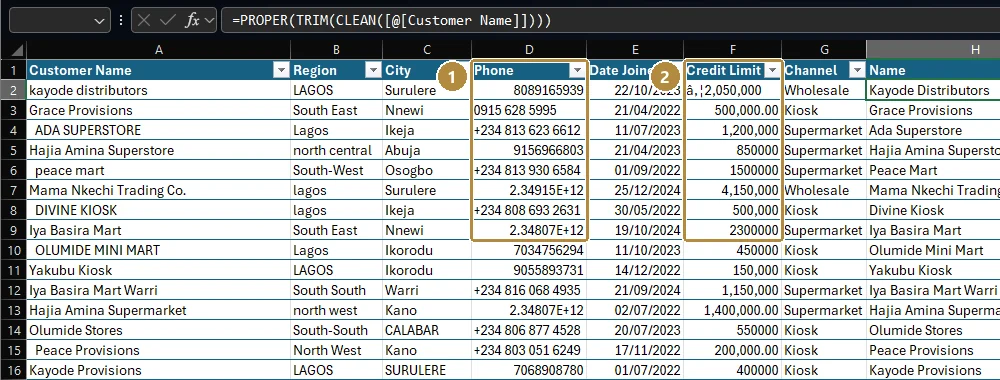
- Phone lost its leading zero (
08089165939became8089165939), and numbers in international format became2.34915E+12. Those digits are gone for good once you save. - Credit Limit shows
₦2,050,000: the₦sign was read with the wrong text encoding, so the column can't be turned into numbers.
Importing through Data → From Text/CSV lets you catch these before they spread.
Values vs formatting. A cell's value is what's stored; its format is how it's shown. 0.19 formatted as a percentage shows 19%. Formatting never changes the value, so rounding a display to 0 decimals doesn't round the number used in calculations.
Calculated columns in a Table. Type a formula once in a Table column and Excel fills it down for every row, using structured references: [@quantity] means "the quantity in this row".
Kolanut revenue for one order line:
Excel formula
=[@quantity]*[@unit_price]*(1-[@discount_pct]/100)Example
Order line 10001: 14 packs × ₦18,600 × (1 − 0 ÷ 100) = ₦260,400.
A 5% discount line of 20 packs at ₦13,200: 20 × 13,200 × (1 − 5 ÷ 100) = 264,000 × 0.95 = ₦250,800.
Walkthrough
In a new workbook, go to Data → From Text/CSV (keyboard: Alt, A, F, T) and choose
orders.csv. In some versions it's under Data → Get Data → From File → From Text/CSV.Excel shows a preview:
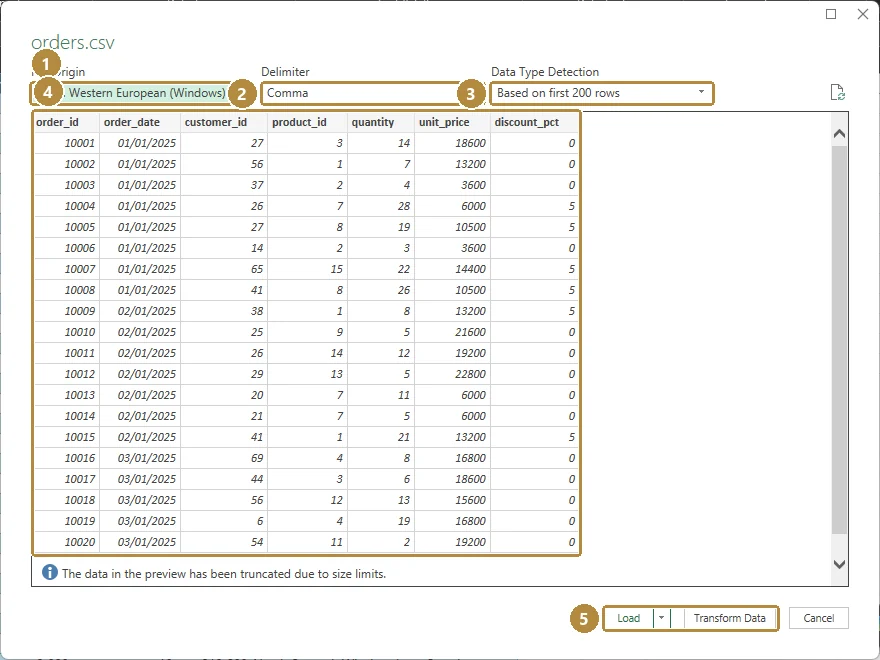
The import preview. Nothing is loaded until you click Load.Tap the image to see it full size. - File Origin: the text encoding. For files containing
₦or other special characters choose 65001: Unicode (UTF-8). - Delimiter: what separates columns. CSV means Comma.
- Data Type Detection: how Excel decides column types.
- The preview. Check that
order_dateshows dates and the numbers are numbers (right-aligned). The dates appear in your computer's date format; here, day first. - Load puts the data on a new sheet as a Table. Transform Data opens Power Query to clean it first.
Click Load.
- File Origin: the text encoding. For files containing
Rename the sheet
Ordersand the TableOrders(Table Design → Table Name).In the first empty column to the right, type the header
revenuein row 1.In row 2 of that column type the formula above and press Enter. Excel fills it down all 4,266 rows.
Select the column and format it: Home → Number → Comma Style, and reduce decimals to 0.
View → Freeze Panes → Freeze Top Row, so the headers stay visible as you scroll.
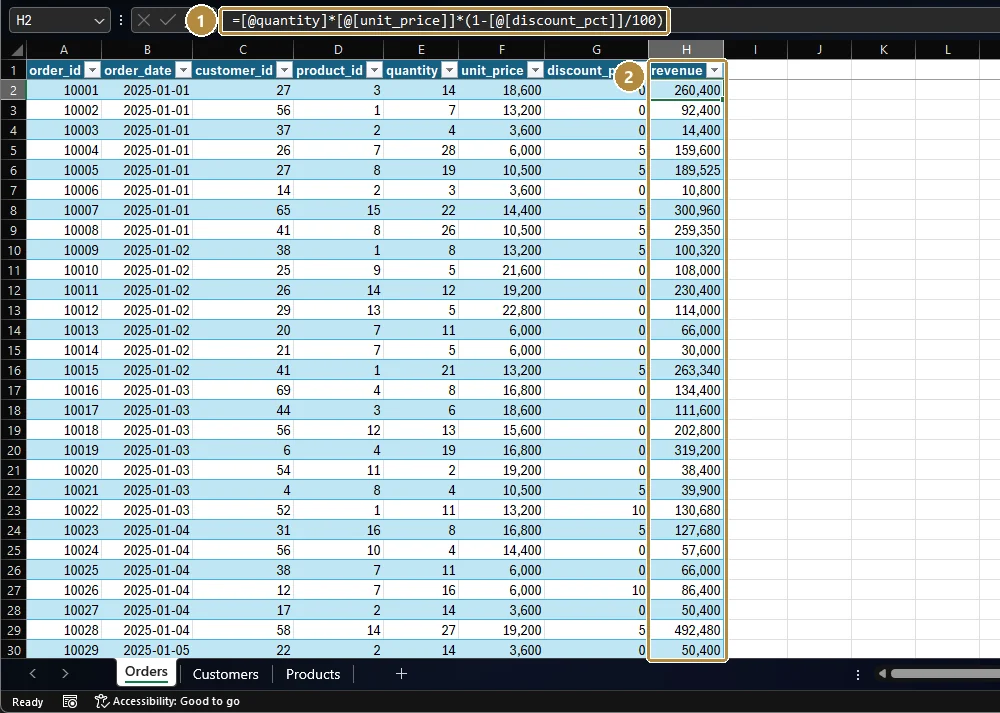
Excel may display the formula as =[@quantity]*[@[unit_price]]*(1-[@[discount_pct]]/100), with extra brackets around column names that contain an underscore. Both forms mean exactly the same thing.
To get the total, click in any empty cell and type:
Excel formula
=SUM(Orders[revenue])Orders[revenue] means "the whole revenue column of the Orders table". It stays correct if rows are added.
Practice
Practice
What is Kolanut's total revenue across all order lines (January 2025 to June 2026), to the nearest naira?
Practice
And before discounts? Add a column for gross value (quantity × unit_price) and total it.
Check your understanding
Answer every question to check.