Module 4 · Excel for Data Analysis
Formulas and functions
How formulas work, relative and absolute references, the core functions, and how to read Excel's error messages.
About 35 minutes
The problem
You'll write hundreds of formulas as an analyst. Most mistakes come from a few causes: a reference that shifts when copied, a function applied to the wrong range, or an error value spreading silently through a workbook. Get the basics right once and those mistakes mostly disappear.
The concept
A formula starts with =. It can use cell references, numbers, operators and functions:
Excel formula
=B2*C2              multiply two cells
=SUM(E2:E4267)      add a range
=ROUND(F2/1000, 1) a function inside a functionOperators follow maths order: brackets, then ^, then * and /, then + and -. =1+2*3 is 7, =(1+2)*3 is 9.
Relative vs absolute references
When you copy a formula, relative references shift; absolute ones (with $) don't.
| Reference | Copied one row down becomes | Use for |
|---|---|---|
B2 | B3 | Row-by-row calculations |
$B$2 | $B$2 | A fixed cell, like a total or a rate |
$B2 | $B3 | Column fixed, row moves |
B$2 | B$2 | Row fixed, column moves |
Press F4 while the cursor is on a reference to cycle through these.
Functions you'll use every day
| Function | Returns |
|---|---|
SUM, AVERAGE, MIN, MAX | Total, mean, smallest, largest |
COUNT | How many cells contain numbers |
COUNTA | How many cells are not empty |
COUNTBLANK | How many cells are empty |
ROUND(x, n) | x rounded to n decimals |
YEAR, MONTH, DAY | Parts of a date |
TEXT(date, "mmm yyyy") | A date shown as text, e.g. "Dec 2025" |
UNIQUE(range) | The distinct values (365/2021, Sheets) |
IFERROR(x, alt) | x, or alt if x is an error |
Error values and what they mean
| Error | Usual cause |
|---|---|
#DIV/0! | Dividing by zero or an empty cell |
#VALUE! | Maths on text, e.g. ="₦1,000"*2 |
#N/A | A lookup found no match |
#REF! | A referenced cell was deleted |
#NAME? | A misspelled function or a missing quote |
#SPILL! | A dynamic array (like UNIQUE) has no room to spill |
Example
Share of total with an absolute reference. With revenue in column H and the grand total in K1:
Excel formula
=H2/$K$1Copy it down: H2 becomes H3, H4…, but $K$1 stays fixed. Without the dollars, the second row would divide by K2, which is empty, and show #DIV/0!.
Month for grouping. Next to each order, =TEXT([@order_date], "yyyy-mm") gives 2025-12, handy for summaries that sort correctly.
Walkthrough
When a sheet has many formulas, Ctrl + ` (the key left of 1) shows every formula instead of its result. Press it again to switch back.
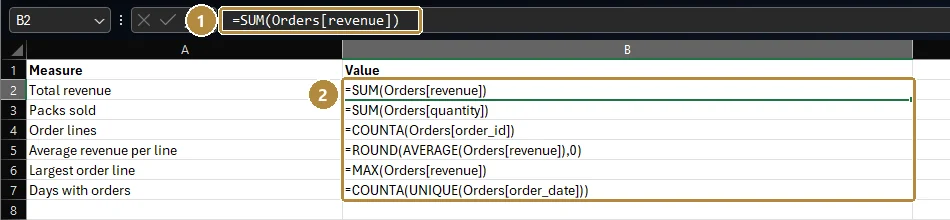
The same summary with results showing: total revenue ₦830,541,245, 58,757 packs, 4,266 order lines, ₦194,689 per line, ₦713,400 largest line, 546 days.
- In your
Orderstable, next to the data, calculate:- total units sold:
=SUM(Orders[quantity]) - average revenue per line:
=AVERAGE(Orders[revenue]) - the number of different days with orders:
=COUNTA(UNIQUE(Orders[order_date]))
- total units sold:
- Wrap the average in
ROUND(…, 0)to get whole naira. - Check a result by a second route: the status bar shows Sum, Average and Count when you select a column. If your formula and the status bar disagree, find out why before moving on.
Shortcuts for formulas
| Keys | Does |
|---|---|
| = | Start a formula |
| F2 | Edit the selected cell (and see which cells it uses) |
| F4 | While editing, cycle A1 → $A$1 → A$1 → $A1 |
| Ctrl + ` | Show / hide all formulas |
| Ctrl + Enter | Enter the same formula into every selected cell |
| Ctrl + D | Fill down from the cell above |
| Alt + = | AutoSum |
| Tab | Accept a function name that Excel suggests while you type |
Practice
Practice
How many packs (units) did Kolanut sell in total across all order lines?
Practice
What is the average revenue per order line, rounded to the nearest naira?
Challenge
Challenge · optional
On how many different days did Kolanut receive at least one order?
Check your understanding
Answer every question to check.