Module 3 · Excel for Data Analysis
Sorting and filtering
Find the rows that matter with multi-level sorts, filters, SUBTOTAL and the FILTER function.
About 25 minutes
The problem
A sales manager asks three quick questions: What was our single biggest order line? How many lines got the full 10% discount? How busy was December? Each answer is buried somewhere in 4,266 rows. Sorting and filtering bring the right rows to the top.
The concept
Sorting reorders rows. Data → Sort lets you sort by several columns in turn: region A→Z, then within each region, revenue largest first (use Add Level).
Filtering hides rows that don't match, without deleting them. Turn filters on with Ctrl + Shift + L (Tables have them already). Each column's drop-down offers:
- tick-boxes for specific values;
- Number Filters (Greater Than, Top 10…);
- Date Filters (This Month, Between…), and dates grouped by year and month in the list.
Counting what you see. SUM and COUNT include hidden rows. SUBTOTAL ignores rows hidden by a filter:
Excel formula
=SUBTOTAL(9, Orders[revenue])The first argument picks the calculation: 9 = sum, 3 = count of non-empty cells, 1 = average. A Table's Total Row (Table Design → Total Row) uses SUBTOTAL automatically.
The FILTER function (Excel 365/2021 and Google Sheets) returns matching rows as a new range, so your original data stays untouched:
Excel formula
=FILTER(Orders, Orders[discount_pct]=10, "none")Example
To find the biggest single order line: click the revenue drop-down → Sort Largest to Smallest. The top row is order line 14243: 29 packs of Body lotion 400ml at ₦24,600 on 27 June 2026, worth ₦713,400.
Walkthrough
This is what filtering discount_pct to 10 looks like:
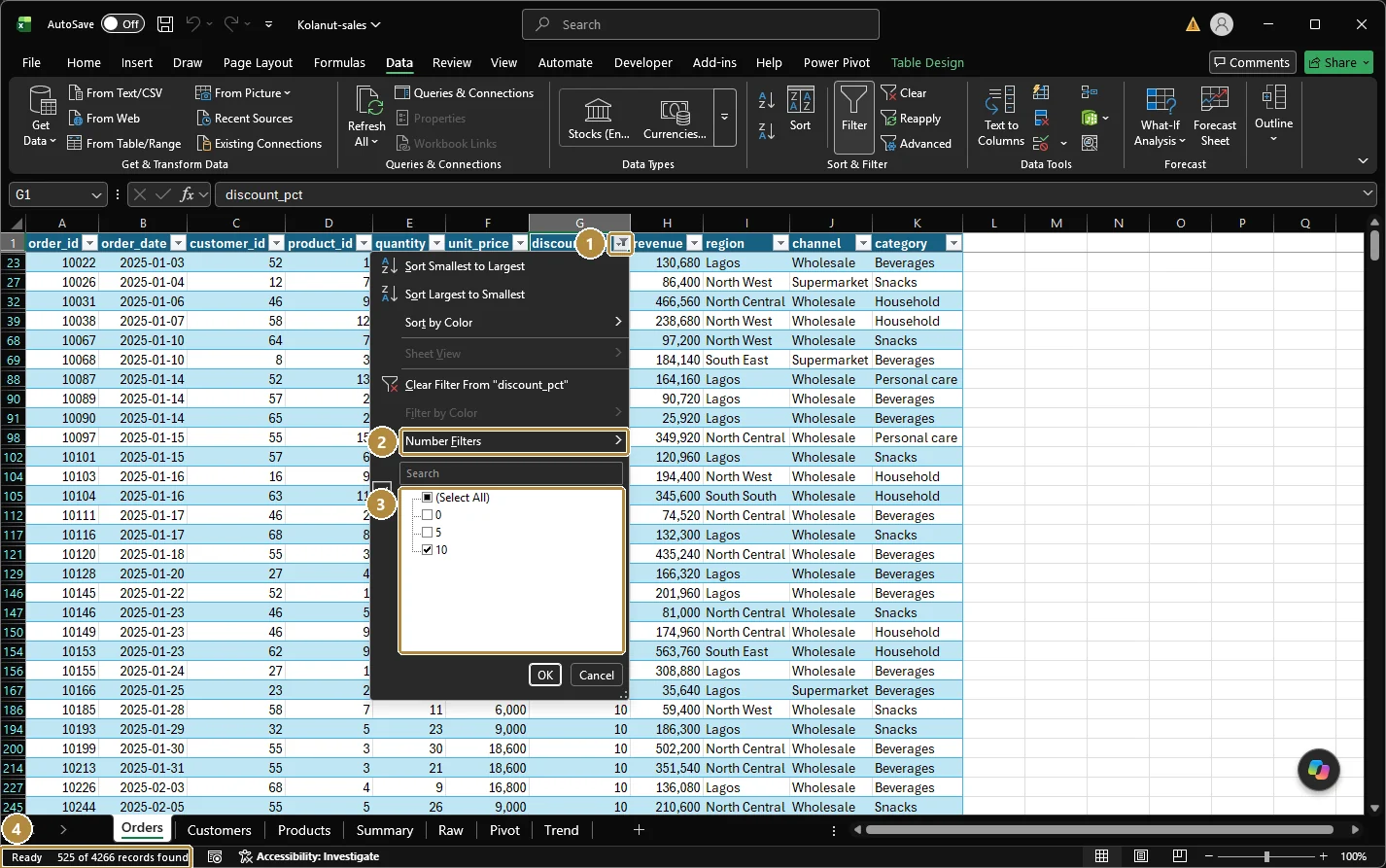
- The filter button on the column header. Once a filter is on, it shows a funnel icon.
- Number Filters: conditions like Greater Than or Top 10. Text columns show Text Filters; date columns show Date Filters.
- The value list: tick the values to keep. Use the search box above it for long lists.
- The status bar reports the result: 525 of 4266 records found.
How many lines had a 10% discount?
- Click the
discount_pctdrop-down, untick Select All, tick 10, OK. - The status bar at the bottom of the window shows "X of 4266 records found". Or turn on the Table's Total Row and set the
order_idtotal to Count. - Clear the filter afterwards: Data → Clear.
How many lines in December 2025?
- Open the
order_datedrop-down. Dates are grouped: expand 2025, untick everything except December. - Read the count the same way.
Shortcuts for sorting and filtering
| Keys | Does |
|---|---|
| Ctrl + Shift + L | Filters on / off |
| Alt + ↓ (on a header cell) | Open that column's filter drop-down |
| Alt, A, S, S | Open the Sort dialog |
| Alt, A, C | Clear all filters |
Practice
Practice
How many order lines received a 10% discount?
Practice
How many order lines were placed in December 2025?
Challenge
Challenge · optional
What is the revenue of the second largest order line, in naira?
Check your understanding
Answer every question to check.