Module 5 · Power BI Fundamentals
Data cleaning in Power Query
Clean a messy export with Trim, Capitalize Each Word, Replace Values, locale-aware dates and case-sensitive duplicate removal.
About 40 minutes
The problem
Kolanut's customer list exported from its old system has stray spaces, random capitals, 23 spellings of six regions, three date formats, money stored as text and 12 customers listed twice. In Excel you'd clean it with formulas. In Power Query you clean it with steps, and when next month's export arrives with the same problems, one refresh cleans it again.
The concept
Text cleaning (select column → Transform → Format):
| Command | Does |
|---|---|
| Trim | Removes spaces at the start and end. Unlike Excel's TRIM, it leaves repeated spaces inside the text |
| Clean | Removes invisible control characters |
| lowercase / UPPERCASE / Capitalize Each Word | Changes case |
Replace Values (Transform → Replace Values) swaps one value for another in a column: SW → South West. For many variants, it's cleaner to lower-case and trim first, which collapses Lagos, LAGOS and lagos into one, then replace what's left.
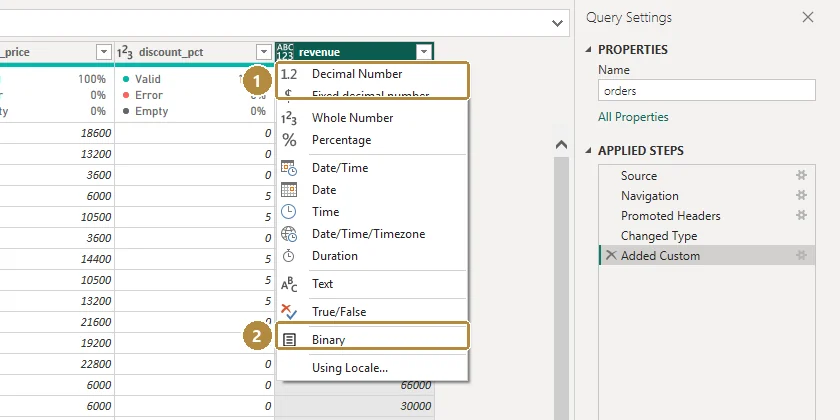
Types with a locale. Right-click a column → Change Type → Using Locale… Choose the type and the locale the data was written in. English (United Kingdom) reads 01/09/2022 as 1 September. The same step handles ISO dates like 2023-07-11 and text like 5-Mar-2024.
Errors. When a type change fails on some rows, those cells show Error. Right-click the column → Replace Errors, or better, find out why first with Keep Rows → Keep Errors.
Removing duplicates is case-sensitive in Power Query. Ada Superstore and ADA SUPERSTORE are different to it (Excel would treat them as the same). So fix case and spaces before Home → Remove Rows → Remove Duplicates.
Example
Credit limits like ₦2,050,000, 1,200,000, 850000 and 1,400,000.00:
- Replace Values:
₦→ (nothing). - Replace Values:
,→ (nothing). - Change Type → Decimal Number (it reads
1400000.00fine), or Whole Number after removing.00. - Blanks become
null, which is correct: the limit is unknown.
Walkthrough
Get data → Text/CSV →
customer_list_raw.csv→ Transform Data.Rename the query
customers_clean.Customer Name: Transform → Format → Trim, then Clean, then Capitalize Each Word.
Region: Format → Trim, then lowercase. Now Replace Values for each remaining variant, lower-case to proper name:
lagos→Lagossouth west,south-west,sw→South West- and the same for South East (
se), South South (ss), North Central (nc), North West (nw).
Check with the column's filter drop-down: exactly six values should remain.
City: Trim, Capitalize Each Word.
Date Joined: right-click → Change Type → Using Locale → Date, English (United Kingdom).
Credit Limit: Replace
₦and,with nothing, then Change Type → Decimal Number.Select Customer Name → Home → Remove Rows → Remove Duplicates.
Check the row count at the bottom of the editor, then Close & Apply.
Look at Applied Steps: that list is your cleaning log.
Practice
Practice
After cleaning and removing duplicates, how many rows does customers_clean have?
Practice
How many customers are in the North West region after cleaning?
Check your understanding
Answer every question to check.