Module 9 · Data Modelling
Modelling in practice
A repeatable process for designing a model, turning it into tables, and testing it with real queries before anyone builds a report on it.
About 40 minutes
The problem
You've learned the pieces: entities, keys, relationships, normalisation, stars. At work, the job arrives as a sentence: "Can we get a dashboard of our law firm's workload and billing?" This lesson puts the pieces in order, from that sentence to a model you can trust.
The concept
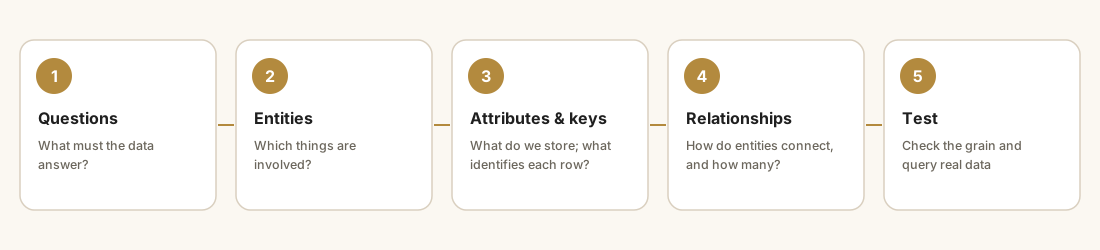
- List the questions the model must answer. Write them down with the people who'll ask them.
- Identify the entities from the nouns in those questions.
- Define attributes and keys, with data types and grain.
- Connect the relationships with cardinality, and resolve many-to-manys.
- Test by loading real data and running the questions as queries.
Documentation that matters: one line per table stating its grain, the key, where the data comes from, and any rule (such as "region is type 2").
Example
Turning a model into tables. This creates a tiny version of Kolanut's product and category tables in the practice database, loads three rows, and joins them. It uses temporary tables, which disappear when you reset the database:
CREATE TEMP TABLE IF NOT EXISTS categories (
  category_id   INTEGER PRIMARY KEY,
  category_name TEXT NOT NULL UNIQUE
);
CREATE TEMP TABLE IF NOT EXISTS products (
  product_id   INTEGER PRIMARY KEY,
  product_name TEXT NOT NULL,
  category_id  INTEGER NOT NULL REFERENCES categories (category_id),
  list_price   INTEGER CHECK (list_price > 0)
);
INSERT OR IGNORE INTO categories VALUES (1, 'Beverages'), (2, 'Snacks');
INSERT OR IGNORE INTO products VALUES
  (1, 'Malt drink 330ml (24)', 1, 14800),
  (2, 'Bottled water 75cl (12)', 1, 4000),
  (7, 'Cabin biscuits (24)', 2, 6600);
SELECT p.product_name, c.category_name, p.list_price
FROM products AS p
JOIN categories AS c ON c.category_id = p.category_id;
Each line of the model became a rule the database enforces: PRIMARY KEY (unique, present), NOT NULL (mandatory), REFERENCES (a foreign key), CHECK (a business rule), UNIQUE (no duplicate category names).
Walkthrough
Step 5, testing, on Harbourline. Before trusting a model, run these checks. You've met each one in this course:
| Check | Query pattern | Expect |
|---|---|---|
| Keys are unique | COUNT(*) vs COUNT(DISTINCT key) | Equal |
| Keys are present | WHERE key IS NULL | No rows |
| No orphans | LEFT JOIN child to parent, parent key IS NULL | No rows |
| Optional relationships are really optional | Count children with no parent, or parents with no children | Explainable numbers |
| Totals reconcile | Total in the model = total in the source | Equal |
| The questions run | Each question from step 1 as a query | Sensible answers |
A model that passes these is ready for a dashboard. A model that doesn't will produce a dashboard nobody trusts.
Practice
Practice
Totals reconcile? Return, in one row, the **total freight charged** on Delivered shipments and the **total amount paid** across all payments, as two columns. (They won't match exactly: some shipments are unpaid or part-paid, and seeing by how much is the point.)
Ctrl + Enter to run. Tab indents; press Esc then Tab to leave the editor.
Practice
Keys are unique? For `shipments`, return the row count and the number of distinct shipment IDs as two columns.
Ctrl + Enter to run. Tab indents; press Esc then Tab to leave the editor.
Check your understanding
Answer every question to check.
When you've finished, take the final assessment, then start the final project from the course page.