Module 2 · SQL for Data Analysis
Relational databases, SQL Server and MySQL
What a relational database is, the database products you'll meet at work, how their SQL differs, and how to find your way around SQL Server Management Studio and MySQL Workbench.
About 30 minutes
The problem
In this course you write SQL in your browser, against a small database. At work, the data lives in a company database: SQL Server at a bank, MySQL behind a website, PostgreSQL at a start-up, Oracle at a telecoms company. You'll open a different program, connect to a server, and find the SQL mostly the same, with a few words that differ.
This lesson maps that world, so the first day on a real database doesn't feel foreign.
The concept
A relational database stores data in tables (relations) of rows and columns, and links the tables through keys:
- a primary key (PK) identifies each row:
customer_idincustomers; - a foreign key (FK) holds another table's primary key, which is how rows relate:
customer_idinshipmentssays which customer booked each shipment.
Here is the Harbourline database you've been querying, drawn as an entity-relationship diagram (ERD):
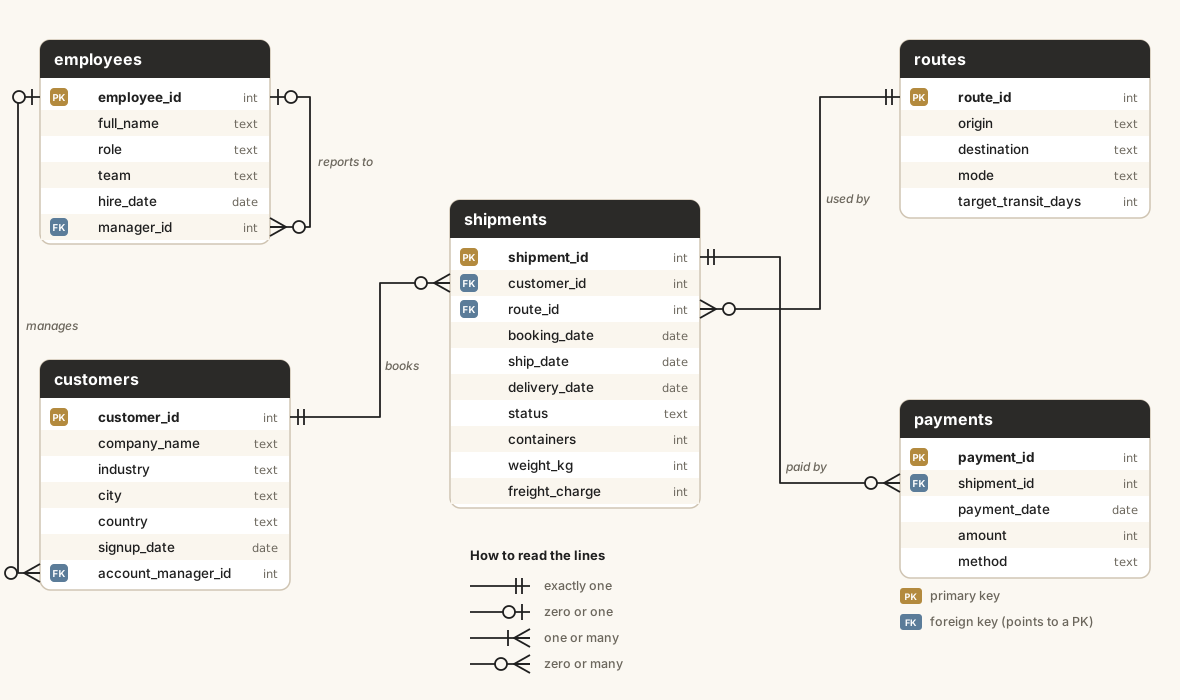
Read one line: a customer books zero or many shipments; each shipment belongs to exactly one customer. The crow's foot (three prongs) marks the "many" end. Every JOIN you wrote in this course follows one of these lines.
An RDBMS (relational database management system) is the software that stores the tables, enforces the keys, and runs your SQL. The ones you'll meet most:
| RDBMS | Made by | Where you'll see it | Main tool |
|---|---|---|---|
| SQL Server (and Azure SQL) | Microsoft | Banks, large companies, anything built on Microsoft tools | SQL Server Management Studio (SSMS), or VS Code with the MSSQL extension |
| MySQL (and its fork MariaDB) | Oracle (open source) | Websites and web apps: WordPress, PHP and many start-ups | MySQL Workbench |
| PostgreSQL | Open-source community | Start-ups, analytics teams, geographic data | pgAdmin, DBeaver |
| Oracle Database | Oracle | Telecoms, government, very large systems | SQL Developer |
| SQLite | Open source | Inside phones, browsers and apps. This course's practice database | Built into the app |
All of them speak SQL, a standard language. Each adds its own dialect: extra functions and a few different keywords. SQL Server's dialect is called T-SQL (Transact-SQL).
Where you'll notice the differences
| Task | SQLite (this course) | SQL Server (T-SQL) | MySQL | PostgreSQL |
|---|---|---|---|---|
| First 10 rows | LIMIT 10 | SELECT TOP (10) … | LIMIT 10 | LIMIT 10 |
| Today's date | DATE('now') | CAST(GETDATE() AS date) | CURDATE() | CURRENT_DATE |
| Year of a date | strftime('%Y', d) | YEAR(d) | YEAR(d) | EXTRACT(YEAR FROM d) |
| Join two texts | a || b | a + b or CONCAT(a, b) | CONCAT(a, b) | a || b |
| Name with a space | "order date" | [order date] | `order date` | "order date" |
Everything else you've learned (SELECT, WHERE, GROUP BY, HAVING, JOINs, CASE, subqueries, CTEs, window functions) works the same way in all of them.
Example
This is the same Harbourline data loaded into SQL Server, queried in SQL Server Management Studio (SSMS). The query finds the ten customers who shipped the most containers in 2025. Don't worry about every line yet: you'll write queries like it by the JOINs lesson. For now, notice TOP (10) where this course uses LIMIT 10.
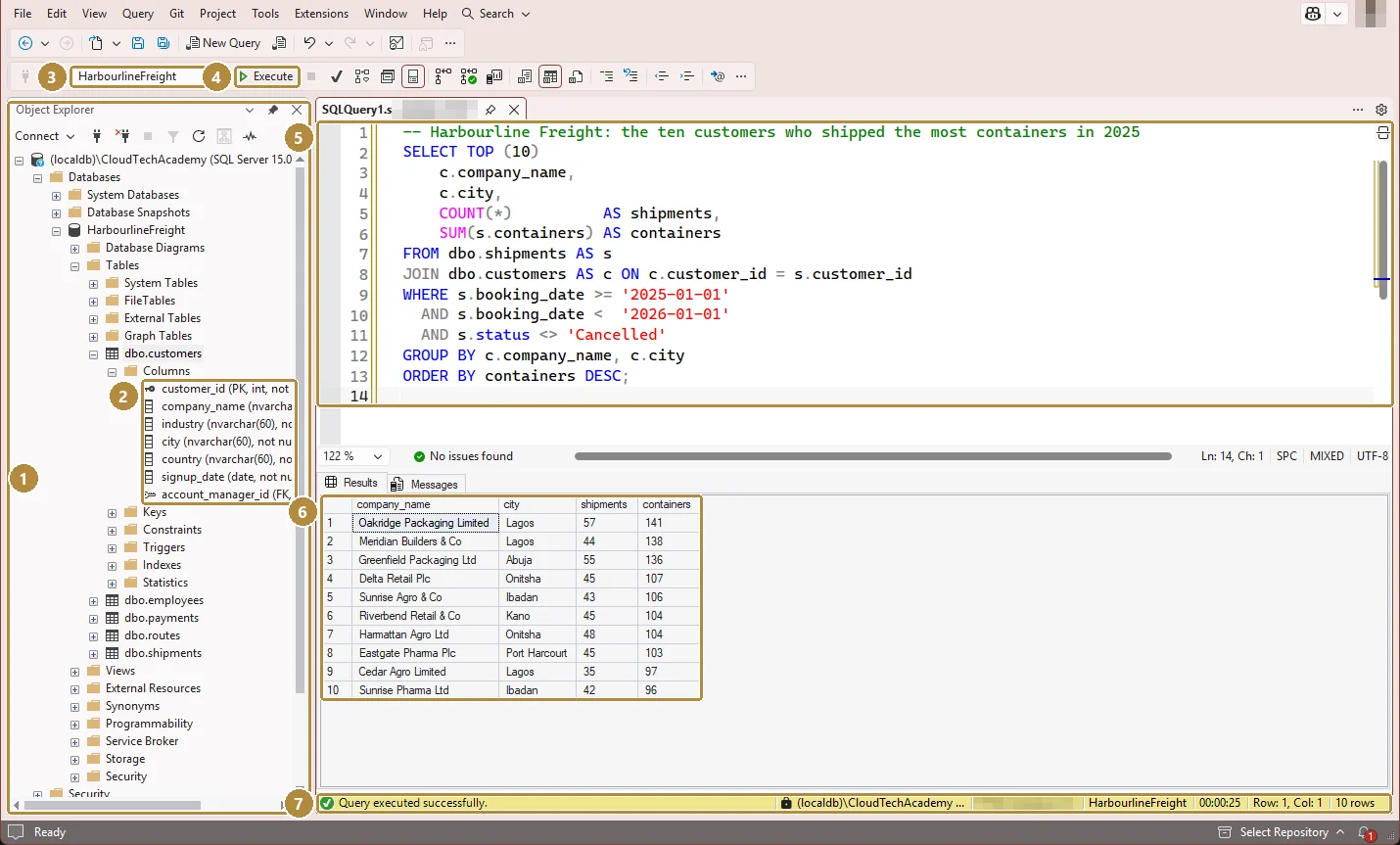
- Object Explorer: the server, its databases, and each database's tables. Press F8 if it's hidden.
- Columns of
dbo.customers, with their data types.PKmarks the primary key,FKa foreign key. - Available databases: which database your query runs against. Check this first when a table "doesn't exist".
- Execute (or F5): runs the query, or only the part you've highlighted.
- The query editor: one tab per query window.
- Results grid: the output. The Messages tab beside it shows errors and row counts.
- Status bar: Query executed successfully, the server, the database, time taken and the number of rows.
Walkthrough
Getting a practice SQL Server on your own computer (Windows)
- Download SQL Server Developer (free for learning and testing) or SQL Server Express (free, smaller) from Microsoft.
- Download SQL Server Management Studio (SSMS), also free.
- Open SSMS. In Connect to Server, type the server name (
localhostfor a default install, orlocalhost\SQLEXPRESSfor Express), choose Windows Authentication, and tick Trust server certificate for a local practice server. Click Connect. - Right-click Databases → New Database… to create one, or restore a sample database.
- New Query (Ctrl + N) opens an editor connected to the database selected in Object Explorer.
SSMS shortcuts worth learning
| Keys | Does |
|---|---|
| F5 (or Ctrl + E) | Execute; runs only the highlighted text if something is selected |
| Ctrl + N | New query window |
| F8 | Show Object Explorer |
| Ctrl + R | Show or hide the results pane |
| Ctrl + D / Ctrl + T | Results as a grid / as text |
| Ctrl + K, Ctrl + C | Comment out the selected lines |
| Ctrl + K, Ctrl + U | Uncomment them |
| Ctrl + Shift + R | Refresh IntelliSense after creating tables |
| Alt + F1 (on a highlighted table name) | Show the table's columns and keys |
MySQL Workbench is laid out much the same way. A simplified picture of its query screen:
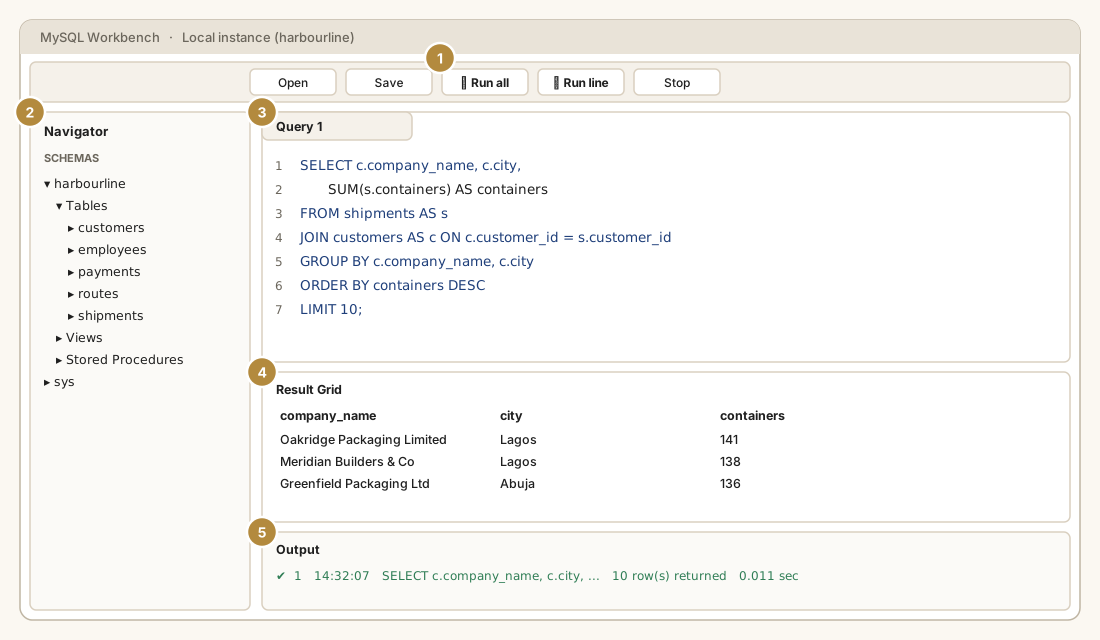
- Toolbar: the lightning bolt runs everything (or the selection); the bolt with a cursor runs only the statement the cursor is in.
- Navigator → Schemas: the databases and their tables. Double-click a schema to make it the default for your queries.
- SQL editor: note
LIMIT 10, as in this course. - Result grid: the output, which you can sort and export.
- Output: each statement, its time and row count, or its error.
In Workbench, Ctrl + Shift + Enter runs everything (or the selection) and Ctrl + Enter runs the current statement.
Practice
A colleague sends you a T-SQL query written for SQL Server:
SQL
SELECT TOP (5) company_name, city, signup_date
FROM customers
ORDER BY signup_date, customer_id;Practice
Rewrite it so it runs here in SQLite: the five customers who signed up first, with company_name, city and signup_date.
Ctrl + Enter to run. Tab indents; press Esc then Tab to leave the editor.
Practice
Looking at the diagram of Harbourline, which table holds the foreign key that links a payment to what it pays for? Name the table.
Check your understanding
Answer every question to check.