Module 5 · AI Agents Foundations
Automations with AI steps
Connect apps with no-code automation tools (n8n, Zapier and Make), add an AI step that reads and labels messages, route each label to the right action, and know when an automation beats an agent.
About 40 minutes
The problem
Ada (lesson 4) makes staff faster, but someone still has to copy every message in and every reply out. Mrs Okafor's manager, Chinedu, asks a sharper question: "Can't the system at least sort the messages for us? Put complaints at the top, answer the delivery-fee questions by itself, and log everything in a sheet so I can see what's happening?"
That's not a job for a free-thinking agent. It's a job for an automation with an AI step: fixed, predictable steps, with AI used only where judgement is needed. Many of the "AI agents" businesses buy are really this, and that's often the right choice.
The concept
How automation tools work
n8n, Zapier and Make let you connect apps by dragging boxes, called nodes or steps, onto a canvas:
- A trigger starts the workflow: a new WhatsApp message, a new row in a Google Sheet, a form submitted, every Monday at 8am.
- Actions do something: send a message, add a row, send an email, create a task.
- Logic steps choose a path: if, switch or router, filter, wait.
- AI steps call a language model: read this message and tell me what it's about, summarise this, draft a reply.
| Tool | Strengths | Pricing model (check current plans) |
|---|---|---|
| Zapier | Easiest to start; thousands of app connections | Per task run; small free plan |
| Make | Visual, powerful branching; good value | Per operation; free plan |
| n8n | Open source; can run on your own server; strong AI and agent nodes | Free to self-host, or paid cloud |
The AI step: classify, extract, draft
Inside an automation, the AI step usually does one of three narrow jobs:
- Classify: "Label this message as price_enquiry, order_status, delivery_fee, complaint or other."
- Extract: "Pull out the order number, product and delivery area as JSON."
- Draft: "Write a reply using this answer from the help file."
Narrow jobs are much more reliable than "handle the customer". And because the steps around the AI are fixed, you know exactly what can happen.
Confidence and the safe default
Ask the AI step for a confidence as well as a label, and send anything uncertain to a person:
Output
Read the customer message. Reply with JSON only:
{"label": one of ["price_enquiry","order_status","delivery_fee","complaint","other"],
 "order_id": the OJ number if there is one, else null,
 "confidence": "high" or "low"}
If you are not sure, use "other" with "low".The safe default is the path anything unexpected falls into, and it should always be a person sees it. Never make the default an automatic reply.
Ọja's sorting workflow
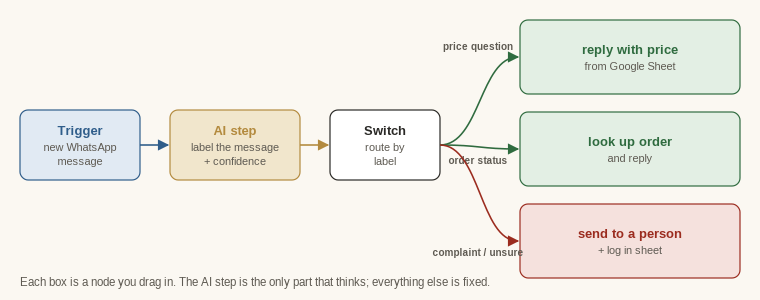
- Trigger: new WhatsApp message (through the WhatsApp Business Cloud API node).
- AI step: label + order number + confidence.
- Switch:
- delivery_fee, high confidence → look up the area in a Google Sheet → send the fee.
- order_status, high confidence → look up the order → send the status.
- complaint, other, or low confidence → post to the team's WhatsApp group or inbox, and reply "Thanks, a member of our team will reply shortly."
- Every path: add a row to a Messages log sheet: time, label, confidence, path taken.
Automation or agent?
| Choose an automation when… | Choose an agent when… |
|---|---|
| the steps are the same every time | the steps depend on the message |
| a mistake must be impossible, not just unlikely | some flexibility is worth some risk |
| you need to explain exactly what happens | conversations go back and forth |
| volume is high and each case is simple | cases combine several needs |
A strong pattern is both: an automation handles the predictable 70%, and passes the messy rest to an agent or a person. n8n and Zapier now include AI agent nodes, which put a small agent with tools inside a workflow, so you can mix both on one canvas.
Costs and limits to watch
- Each run uses tasks or operations on your plan, and each AI step costs tokens (lesson 1 of the Python course explains these).
- WhatsApp replies outside 24 hours of the customer's last message need approved templates (course 3).
- Log every run. When something goes wrong, the log is how you find out what happened.
Example
Ọja's manager listed which messages are safe to handle fully automatically. The inbox's automatable column records his judgement for every October message:
| automatable | messages | staff minutes |
|---|---|---|
| full | 312 | 1,718 |
| with_human | 126 | ? |
| no | 42 | ? |
312 messages, 65% of the month, could have been handled with no person involved, and they took 1,718 staff minutes: nearly 29 hours. That's the prize for a good automation. The with_human messages are where an agent drafts and a person approves.
Walkthrough
You can design this on paper, or build it in n8n's free cloud trial or Make's free plan. Using a Google Sheet as the trigger lets you test without WhatsApp.
- Create a Google Sheet called Incoming messages with columns time, message and label. Add ten messages from the inbox (write realistic message text for each intent).
- In n8n or Make, create a new workflow with the trigger Google Sheets: new row.
- Add an AI step (n8n: Basic LLM Chain or OpenAI/Anthropic node; Make: OpenAI or Anthropic Claude module) with the classify prompt above.
- Add a switch / router with three paths: delivery_fee, order_status, and everything else including low confidence.
- For each path, add a Google Sheets: update row action that writes the label and path into the sheet. (Replies come later, once WhatsApp is connected.)
- Run it on all ten rows. Check every label by hand and count how many were right.
- Change one message so it's ambiguous ("wetin happen to my thing?") and check that it falls into the person path.
Practice
Practice
How many October messages did the manager mark as full (an agent or automation could handle them alone)?
Practice
How many hours of staff time did the with_human messages take? One decimal place.
Task
12 minDesign an automation with an AI step for a business you know (or for Ọja's Instagram DMs). Write: the trigger, the AI step's job and prompt, the paths (with what each does), the safe default, and what gets logged. Then say in one sentence why this should be an automation, not an agent.
Your work is checked for
- Has a trigger
- Has an AI step that classifies, extracts or drafts
- Has at least two paths (path, route, switch, if…)
- Has a safe default to a person
- Logs runs
- Explains why automation, not agent
Check your understanding
Answer every question to check.